
The right social media scheduler is the one you'll actually keep using, not the one with the longest feature list. For a small business that means a calendar you can read at a glance, the ability to post to your two or three platforms in one go, a media Library so you're not hunting for that job photo every time, and analytics written in plain English. Almost everything else on a comparison table - AI hashtag generators, "social listening", twelve-platform support you'll never touch - is noise. Pick the tool that makes posting consistently the path of least resistance, and ignore the rest.
Key takeaways
- The deciding factor is whether you'll still be using it in three months, not how many features it has on day one.
- A clear calendar view matters more than anything else - if you can't see your month at a glance, you'll stop scheduling.
- You need the platforms your customers are on, not the most platforms. Two or three done well beats twelve listed.
- A built-in media library saves more time over a year than any AI gimmick on the box.
- Analytics only help if you understand them; plain-language reporting beats a dashboard of metrics you ignore.
Start with the job, not the feature list
Most reviews of a social media scheduler compare tools the way you'd compare phones - line up the specs, count the ticks, pick the longest column. That's the wrong instinct for a small business, because the tool with the most features is usually the one with the steepest learning curve and the highest monthly bill.
The job is simple. You want to sit down once a fortnight, load up two or three weeks of posts, and have them publish without you. Everything you assess should ladder back to that. In my experience, the businesses that stick with scheduling are the ones who chose the simplest tool that did that job, not the most capable one.
So before you look at any feature, write down the three things you actually do: which platforms you post to, where your photos and clips live, and how you decide what worked. Those three answers tell you what to look for. That same discipline of scheduling and batching is covered in our scheduling guide - the tool is only half of it.
The features that actually decide it
A calendar you can read
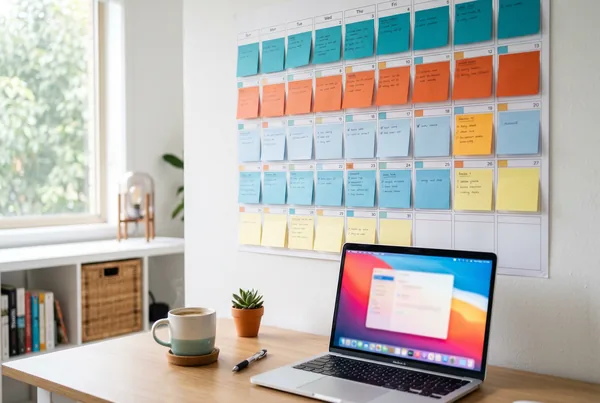
The single most important part of a social media scheduler is the calendar view, and it's the part most comparison tables barely mention. You need to open it and see, in one glance, what's going out this week, what gaps you've got, and where you're doubling up.
This matters because the failure mode of scheduling isn't picking the wrong tool - it's quietly stopping. A cluttered, confusing calendar is friction, and friction is what makes you stop. A clean one pulls you back in. When you're assessing a tool, spend less time on the post composer and more on the calendar: can you drag a post to a new day, see all your platforms in one view, and tell at a glance whether next week is covered?
Multi-platform posting in one pass
You should be able to write or generate a post once and send it to every platform you care about, with the format adjusted for each. Without that, you're back to copying and pasting between apps, which is exactly the manual work that scheduling is supposed to remove.
Be realistic about which platforms you need, though. A scheduler that supports a dozen networks isn't more useful than one that supports the three your customers actually use - it's just a longer list. A tradie needs Facebook and Instagram done well. A consultant needs LinkedIn done well. Match the tool to where your customers are, not to the size of its logo wall.
A media library that remembers your photos
Here's the unsung feature: somewhere to keep your job photos, before-and-afters, and short clips so they're a click away when you're building a post. Without it, every scheduling session starts with ten minutes of hunting through your phone's camera roll.
A built-in media Library - like the one in MicroPromote - means you upload a photo once, and it's there every time you want to use it. Over a year, that quiet bit of plumbing saves more time than any of the AI features that get top billing on the pricing page.
Analytics you'll actually read
Most schedulers bury you in numbers. The ones worth your money tell you what happened in plain English: did this reach new people, did anyone save or share it, did it lead to an enquiry. If you need a tutorial to understand the dashboard, you won't look at it, and analytics you don't look at are worthless.
Look for plain-language analytics framed around reach, engagement and results rather than a wall of vanity metrics. The point isn't to admire the graphs - it's to know what to make more of next fortnight.
The features you can safely ignore
A lot of what sells a social media scheduler is there to pad the comparison table. AI hashtag suggestions, "best time to post" predictors, sentiment analysis, competitor tracking, follower-growth dashboards - for a small business these range from mildly useful to actively distracting. They make a tool look powerful in a demo and add almost nothing to whether you post consistently.
The test is straightforward: does this feature help me batch a fortnight of proof-of-work posts and publish them without me? If not, it's optional. Don't pay extra for it, and don't let it talk you into a tool that's harder to use day to day.
A worked example
Say you run a café and you're choosing between three tools. The first has the longest feature list and a price to match - social listening, AI caption rewriting, fifteen platforms. The second is cheap but only really does Instagram. The third sits in the middle: a clean calendar, posts to Facebook and Instagram in one pass, a media Library, and simple reporting.
You post photos of the food, the occasional event, and customer moments. You're on Facebook and Instagram, nowhere else. You've got maybe an hour a fortnight.
The first tool loses not because it's bad but because you'll use a tenth of it and resent the bill. The second loses because the day you want a Facebook post you're stuck. The third wins: it does exactly your job and nothing you'll trip over. That's the whole decision - fit, not features. The point of scheduling your posts is to remove friction, and the right tool is the one with the least of it for your business.
This is also why it's worth understanding how the platform behind the scheduler fits together - the calendar, the Library, the drafting and the analytics working as one loop rather than four disconnected apps you have to stitch together yourself.
The bottom line
Choosing a social media scheduler isn't a spec-sheet exercise. The tool that wins is the one that makes posting consistently the easy option for your business: a calendar you can read, the two or three platforms your customers use, a Library that remembers your photos, and analytics in plain English. Match it to the job in our scheduling guide, skip the features that only look good in a demo, and browse the rest of the blog for more on getting the loop running. The best scheduler is the one you're still using in three months.
Want to see it run on your business? Book a demo or start now.