
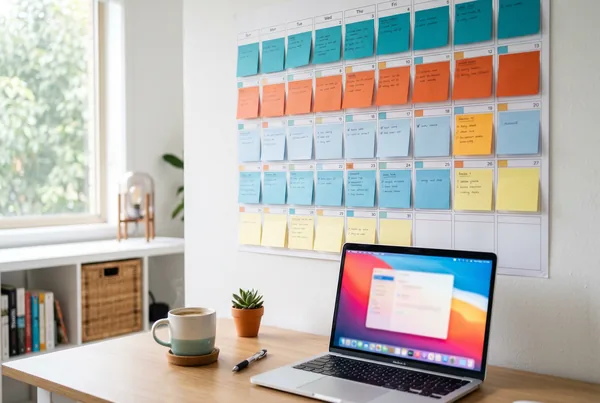
A content calendar earns its keep only when posts actually leave the building. In twenty years of running training organisations I have watched plenty of beautifully colour-coded grids - every idea anyone might one day publish, laid out in neat cells - and almost none of them survived contact with a busy month. The version that works is short and dull: a fixed weekly cadence (say, three posts), a small set of post types you can fill on autopilot, and one batching session that loads the whole week at once. The calendar's job is to remove decisions, not add them. If yours makes you choose what to post each morning, it will quietly stop being used by week three.
Most calendars die the same way. They start ambitious - daily posting, five platforms, a fresh idea every time - and collapse under their own weight the first busy week. The fix is not more discipline. In my experience it is a smaller, duller plan that survives a bad week.
Key takeaways
- A calendar that ships beats a clever one that stalls - pick a cadence you can hit on your worst week, not your best.
- Lock a fixed weekly rhythm (e.g. Mon/Wed/Fri) so the only open question is what, never whether.
- Use a handful of repeatable post types so blank-page paralysis never happens.
- Batch creation and scheduling into one sitting, then let the queue publish for you.
- Review the calendar monthly against what your analytics say is working - and prune the rest.
Start with cadence, not ideas
Start with the number of posts per week you can sustain through your busiest fortnight, then halve your instinct. Three posts a week, published reliably for a year, beats a daily plan you abandon in March. Consistency is what platforms reward and what audiences notice; a feast-and-famine pattern teaches your followers to stop expecting you. I have seen that lesson land the hard way more than once.
Anchor the cadence to fixed days and times. "Monday, Wednesday, Friday at 9am" is a calendar. "A few times a week when I get a chance" is a wish. Fixed slots turn posting into a habit you can defend against everything else competing for your attention.
Match cadence to platforms, not the other way around
You do not need to be everywhere. Choose the one or two platforms where your audience actually is, and serve them properly. A single strong LinkedIn and Instagram presence will out-perform a thin spread across five networks you can't keep fed. When you do publish to several at once, write once and adapt per platform rather than treating each as a separate job.
Fill the calendar with repeatable post types
Blank cells are where calendars go to die. Replace "what should I post?" with a rotating menu of post types you can always fill:
- Behind the scenes - how the work actually gets done.
- Proof - a result, a before/after, a short client story.
- Teach one thing - a single tip your customer can use today.
- Answer a real question - something you get asked every week.
- Promote - the offer, the event, the new intake.
Now your Monday slot isn't "think of something brilliant" - it's "this week's teach-one-thing." The creative work shrinks to filling a known shape, which is the difference between a five-minute task and an hour of staring.
This is also where an AI-first tool earns its place. In MicroPromote you can hand it the post type and a rough topic and get a first draft - caption, image, even a short video or voiceover - in minutes, then adjust the tone to sound like you. You are directing the content, not manufacturing it from scratch. The calendar tells you what kind of post is due; the tool helps you produce it fast enough to stay ahead of the queue.
Batch, then schedule - don't post live
The single biggest reason posts don't go out is that "posting" gets bundled with "being free at 9am on a Tuesday." Decouple them. Set aside one session - a fortnight's worth in an hour is realistic once your post types are settled - to create everything, then load it all into the queue.
Once it's scheduled, publishing is no longer your problem. The calendar fires on the days and times you set, across every connected platform, whether or not you're at your desk. MicroPromote's scheduling calendar holds the whole queue in one view, so you can see the week at a glance, spot a gap, and fill it before it becomes a silent Friday. A media Library means the image and video assets you've already made are one click away, so batching the next round is faster than the last.
The mental shift is this: you are not a person who posts on social media. You are a person who loads a queue every other week. That framing is what makes the cadence stick.
A worked rhythm
Here's a calendar that ships, for a business publishing three times a week:
- First Monday of the fortnight, 30 - 60 minutes - draft six posts (two of each: teach, proof, promote), generate or pull images from the Library, and queue all six to Mon/Wed/Fri slots across the next two weeks.
- Mid-fortnight, 5 minutes - glance at the calendar, swap anything that's now stale (a sold-out event, a changed offer).
- End of the month, 15 minutes - open analytics, see which post types pulled their weight, and rebalance next month's mix toward them.
That's roughly 90 minutes a month for a steady, twelve-posts-a-fortnight presence. The plan is deliberately boring. Boring is what survives.
Keep it alive: review against what works
A calendar is a living thing, not a New Year's resolution. Once a month, hold it up against reality. Which post type got saved and shared? Which one quietly underperformed every time? Drop what doesn't land and double the slot count for what does. Our companion piece on social media analytics that matter covers which numbers should drive that decision - the short version is reach, engagement and ROI, not vanity follower counts.
The calendar and the analytics are two halves of the same loop: the calendar gets posts out, the analytics tell you what to put in it next. Skip either half and the system stalls.
The bottom line
A social media content calendar that actually ships is small, fixed, and repeatable. Choose a cadence you can defend on a bad week, fill it with a short menu of post types, batch the work into one sitting, and let a scheduler do the publishing. Then review monthly and prune. The goal was never a beautiful grid - it was posts out the door, every week, without a daily decision tax. Browse more on the blog, or see how MicroPromote keeps the whole queue in one place.
Book a demo or start now.